
My Chagiga
☰
← All stories

Event planner

How a planning agency added a do-it-yourself tier without adding hours

Shira’s agency plans about 30 full-service simchas a year. Every month she turned away families who wanted a little guidance but couldn’t justify a full planning fee. My Chagiga gave her a way to say yes.

Shira Goldberg · Owner, Simcha by Shira · Teaneck, NJ

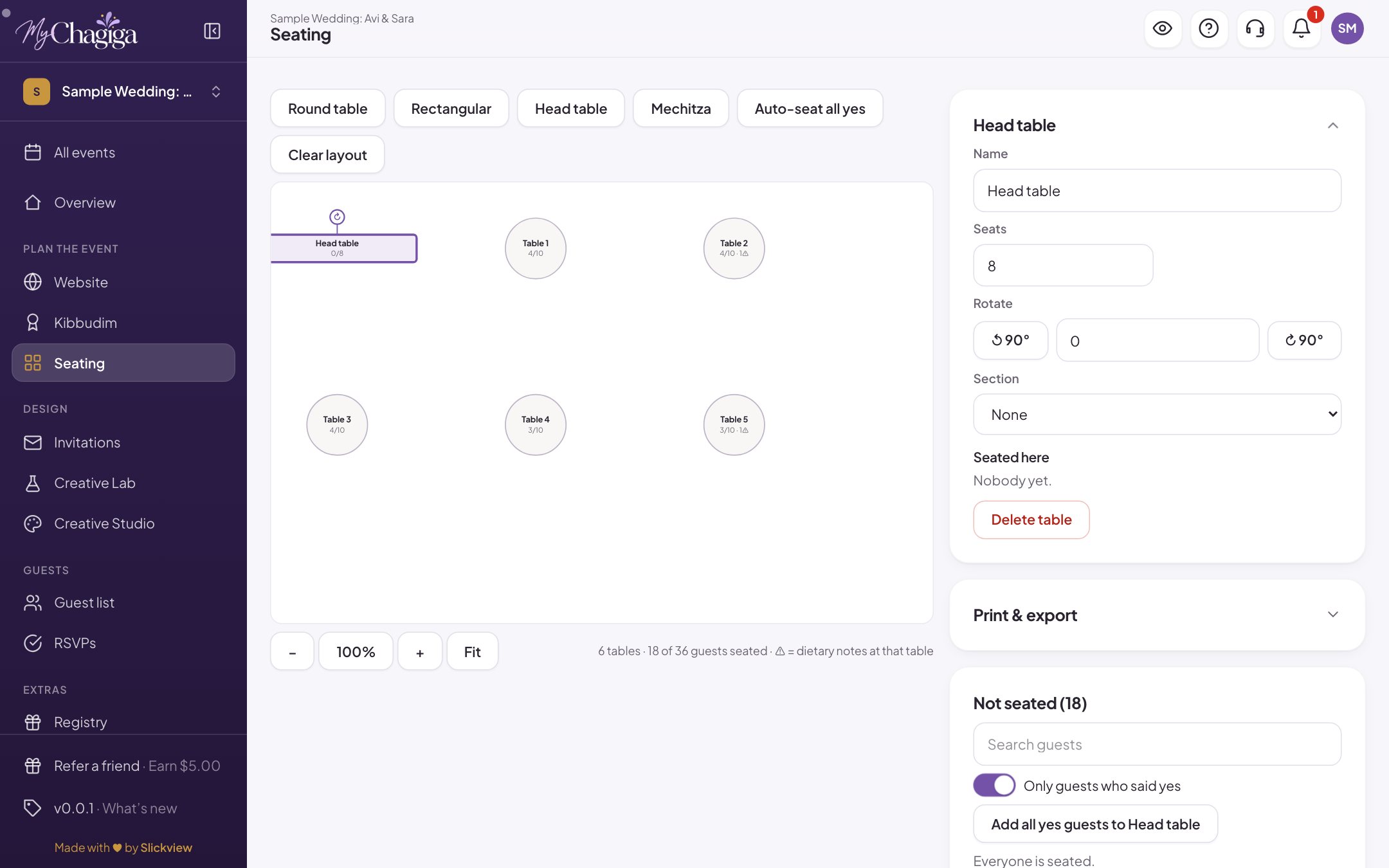
The seating chart builder with tables and guests
DIY clients in a year
37
of her time per DIY client
~2 hrs
spreadsheets emailed
0

The challenge

Families with smaller budgets kept asking for “just a little help” with a bar mitzvah or a sheva brachos. Every one of those turned into dozens of texts and a guest list in someone’s Google Sheet.

Shira didn’t want to say no, and she didn’t want to give away her evenings either.

How they used My Chagiga

  1. 1

    A DIY package built on the family’s own account

    Each DIY client opens their own free account and picks the plan they need. Shira runs a two-hour kickoff call where they build the schedule and guest list together.

  2. 2

    Added as a co-host

    The family adds Shira as a co-host, so she can look over the guest list, the seating chart and the run of show without asking for a spreadsheet.

  3. 3

    A checklist she can reuse

    On Simcha events she sets up the task checklist from her own template, and the family emails tasks straight to their caterer and florist.

  4. 4

    Her partner link in every proposal

    Families who sign up through her link get a welcome gift in their wallet, and Shira earns a referral fee on every plan they buy.

Spotlight · Task checklist emailed to vendors

The checklist that runs the DIY package

Shira’s DIY families don’t need her every day. They need to know what to do next, and who is supposed to be doing it. That is the task checklist.

She keeps a master checklist for a bar mitzvah and one for a sheva brachos, built from fifteen years of doing this. At kickoff she copies the steps into the family’s event. Each one gets a due date and an owner.

The tasks that belong to a vendor go to the vendor. The caterer gets “Send final headcount” by email, opens their own task page without signing up, and marks it done. The family sees the tick, and so does Shira.

    Step by step

  1. 1Copy her master checklist into the family’s event at kickoff
  2. 2Set due dates counting back from the simcha
  3. 3Assign each task to the family, Shira or a vendor
  4. 4Email vendor tasks straight from the checklist
  5. 5Check one screen on Monday mornings to see what’s late
I used to be the reminder service. Now the checklist is. I look at it on Monday morning, and if something’s late I send one message, not twenty.
Shira Goldberg on task checklist emailed to vendors

The result

  • ✓Shira took on 37 DIY families in her first year, at about two hours each, alongside her full-service work.
  • ✓Three of those families came back for full-service planning on their next simcha.
  • ✓The referral fees cover the cost of her own planning software, with some left over.
“My full-service clients get me. My DIY clients get me for two hours and My Chagiga for everything else, and they still feel looked after.”
Shira GoldbergOwner, Simcha by Shira, Teaneck, NJ

The tools they used

What Shira used, and how

✓Co-host access

Each DIY family adds Shira as a co-host. She sees the guest list, replies and schedule without asking anyone to export anything.

✓Budget and vendor tracker

At kickoff she enters the family’s total budget and every vendor with its deposit and balance. The family sees what’s paid, what’s due and what’s left, and gets an email three days before each balance is due.

✓Receipt scanning

Families photograph a florist or rental receipt and the cost fills itself in, so the budget stays current without Shira chasing numbers.

✓Task checklist

She keeps one checklist for a bar mitzvah and one for a sheva brachos, and copies the steps in for each new family. Each task has a due date and an owner.

✓Tasks emailed to vendors

“Send final headcount” goes to the caterer, “Confirm delivery time” to the florist. They open their own task page, mark it done, and the family sees it.

✓Shopping list

Favors, kippot, centerpieces and bentchers go on one list with prices, who’s buying and a link to the product. The prices add up in the budget.

✓Seating chart

For DIY clients she does one 30-minute seating review on a call, dragging tables with the family instead of redrawing it on paper.

✓Day-of run of show

Shira builds the timeline and shares the link with the DJ, photographer and a family friend who runs the day, so she doesn’t have to be there.

✓Partner program

Her partner link is in every DIY proposal. She earns a referral fee on every plan those families buy, now and on their next simcha.

Ready when you are

Your Day Should Be a Chagiga.

  1. Plan it
  2. Invite everyone
  3. Celebrate

Your event gets its own link:yourname.mychagiga.com

Build your guest list and schedule free. Choose a plan when you’re ready to design and send.

Planning tips

Simcha planning, in your inbox

Timelines, new invitation designs and the occasional offer. Never more than a couple of emails a month.

We’ll email you a link to confirm. Unsubscribe anytime. See our privacy policy.