My Chagiga
☰
← All stories

Caterer

A kosher caterer who turned a free listing into a steady stream of booked events

Yossi’s catering business ran on word of mouth from three shuls. He listed it in the My Chagiga vendor directory to see what would happen.

Yossi Mizrahi · Owner, Mizrahi Kosher Catering · Baltimore, MD

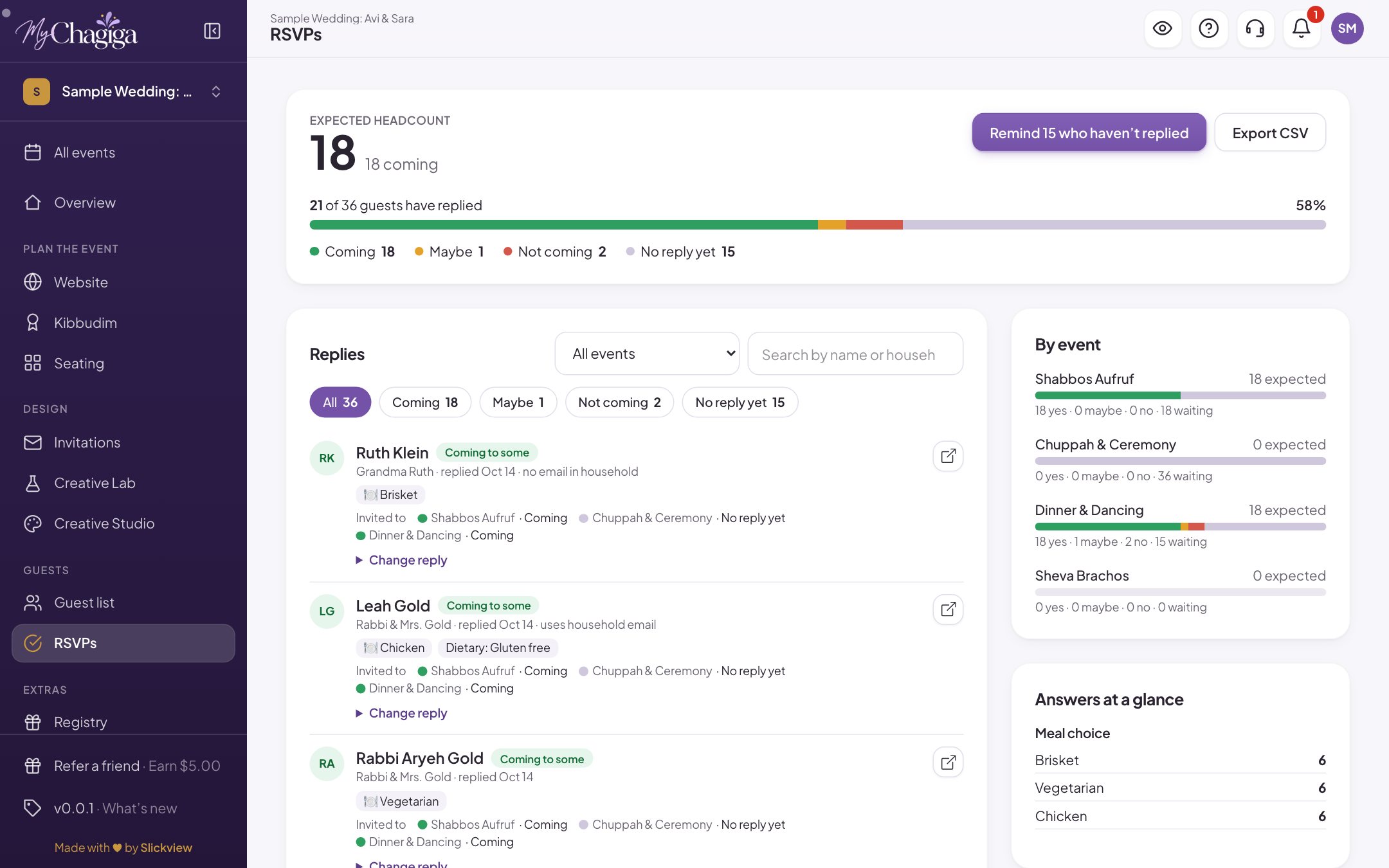
An RSVP tracker with headcount and meal choices
inquiries in six months
41
events booked
9
to list
$0

The challenge

Most of Yossi’s new business came from families who had eaten at someone else’s simcha. When things were slow, he had no way to be found by families outside his community.

The inquiries he did get from his website were usually just “how much for a bar mitzvah?”, which took three calls to turn into a real quote.

How they used My Chagiga

  1. 1

    A listing with his hechsher on it

    He listed his services, the states he caters in, his kosher standard and eight photos of his best work. Hosts filtering for glatt kosher in Maryland found him.

  2. 2

    Every inquiry became a job

    Inquiries arrived with the event type, date, guest count and budget. He turned each serious one into a job with a quote, tasks and messages in one place.

  3. 3

    Deposits by card

    He connected Stripe, so hosts paid the deposit from their private job page. The money went straight to his own Stripe account.

  4. 4

    He sent hosts his way, too

    He invited past clients to plan their next simcha on My Chagiga, so their final headcount and meal choices came straight from their RSVPs.

Spotlight · Quotes and job financials

From “how much?” to a signed quote and a paid deposit

An inquiry from a host arrives with the event type, date, guest count and budget. Yossi turns it into a job, and the job is where the quote lives.

He builds the quote line by line: the menu per head, service staff, rentals, the mashgiach. The host opens it on their private job page with no account needed, asks questions in the job’s messages, and accepts it there.

Once it’s accepted, the job tracks the money. He sets the deposit and the balance, the host pays by card from the same page, and the financials tab shows what’s paid, what’s due and when. For a host who pays by check or Zelle, he records it by hand at no cost.

    Step by step

  1. 1Inquiry arrives with date, guests and budget
  2. 2He turns it into a job and builds the quote
  3. 3The host reviews and accepts it on their job page
  4. 4Deposit paid by card, straight to his Stripe account
  5. 5Balance tracked until the event, then marked paid
I used to send a PDF, wait a week, call, and wait again. Now the quote, the questions and the deposit are all in one place, and half my clients pay the deposit the same day they accept.
Yossi Mizrahi on quotes and job financials

The result

  • ✓41 inquiries in six months, and 9 of them became booked events, most from families he had never met.
  • ✓Deposits came in days sooner, because hosts could pay the moment they accepted the quote.
  • ✓Final headcounts and meal choices came from the host’s RSVPs and the caterer report, so there was no last-minute count on the phone, and no wasted plates.
  • ✓His servers worked from the seating chart and the run of show, so the gluten-free plates reached the right tables on time.
“The inquiries arrive with the date, the headcount and the budget. I can send a quote the same evening instead of playing phone tag for a week.”
Yossi MizrahiOwner, Mizrahi Kosher Catering, Baltimore, MD

The tools they used

What Yossi used, and how

✓Directory listing

His services, the states he caters in, a glatt kosher badge and eight photos. Hosts filtering by kosher standard and state find him.

✓Inquiries with the details

Each inquiry arrives with the event type, date, guest count and budget, so he can price it the same evening.

✓Jobs

He turns each serious inquiry into a job, with an overview, messages, financials and tasks in one place instead of across email, texts and a notebook.

✓Quotes and financials

He sends the quote from the job, then tracks the deposit and the balance against it. He can see at a glance which events still owe him.

✓Card payments through Stripe

Hosts pay the deposit or the balance from their private job page, with no account needed. The money goes straight to his Stripe account.

✓Shared tasks

“Choose the menu by March 1” and “Send final headcount” are tasks the host sees on their job page, so nothing waits on a phone call.

✓On the host’s budget

Hosts add him to their event’s vendor list, so his deposit and balance show up in their budget and they get a reminder before the balance is due.

✓Guest lists and meal choices

When his clients plan on My Chagiga, guests pick meat, fish or vegetarian, and note allergies, as they RSVP. The count he cooks for comes from the replies, not a phone call the week before.

✓Caterer report

The host sends him one report with the headcount, meal choices and every dietary note, per meal and per sub-event. Friday night, the kiddush and the Sunday party each get their own numbers.

✓Seating chart and table numbers

With the seating chart, his servers know which table has the three gluten-free guests and which has the kids’ meals.

✓Day-of run of show

Hosts share the run of show link, so his team knows when the hors d’oeuvres go out, when the speeches start and when to hold the main course.

✓Tasks from the host

When a host emails him a task like “Confirm the final menu”, he opens it on his own task page and marks it done, without needing an account.

✓Invite hosts

He sends past clients an invitation to plan their next simcha on My Chagiga, in his name, from his vendor portal.

Ready when you are

Your Day Should Be a Chagiga.

  1. Plan it
  2. Invite everyone
  3. Celebrate

Your event gets its own link:yourname.mychagiga.com

Build your guest list and schedule free. Choose a plan when you’re ready to design and send.

Planning tips

Simcha planning, in your inbox

Timelines, new invitation designs and the occasional offer. Never more than a couple of emails a month.

We’ll email you a link to confirm. Unsubscribe anytime. See our privacy policy.